One prompt. AI images for your whole catalog.
Turn the product photos you already have into AI-generated white-background, lifestyle and close-up shots — for one product or every product in your Shopify store. You review each image before it goes live.
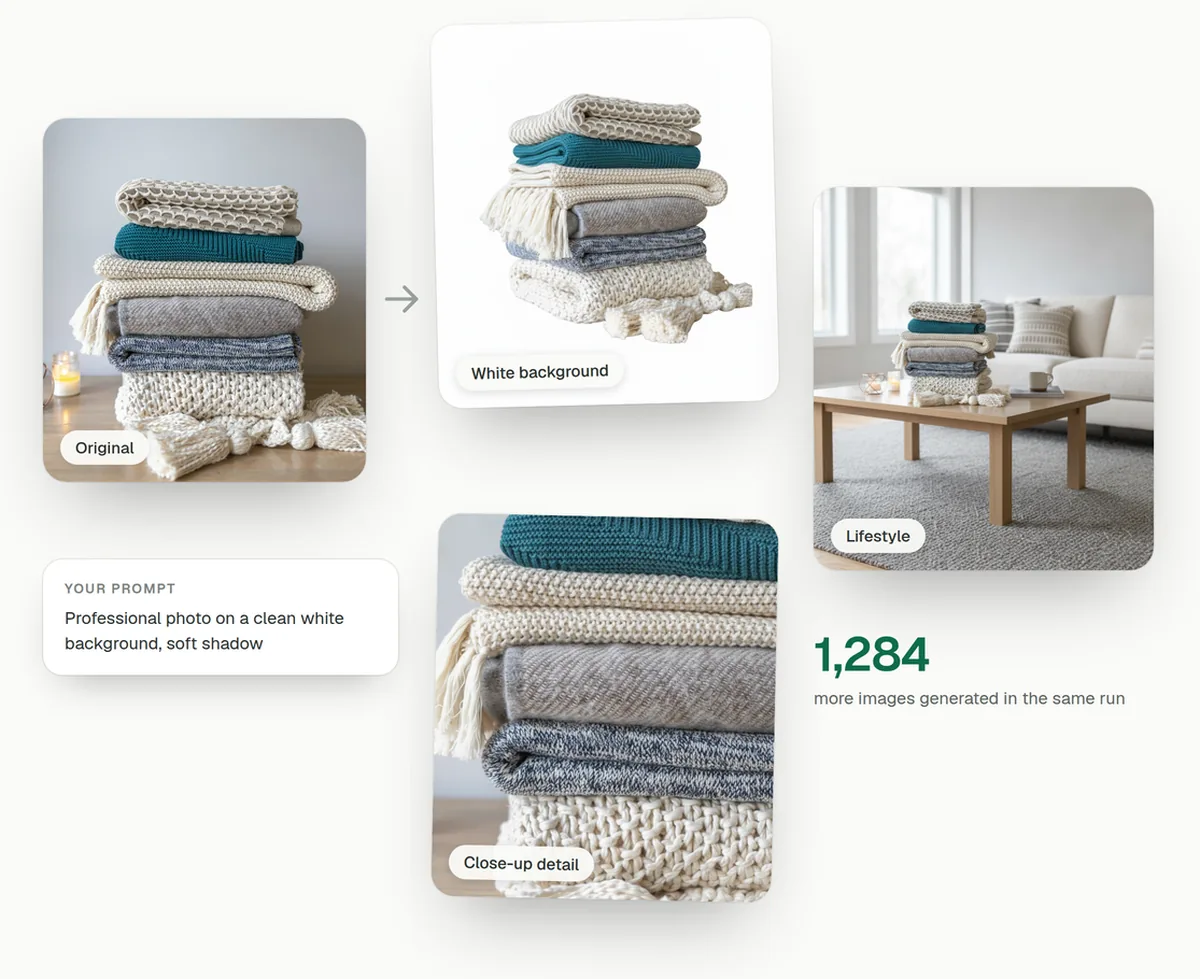
Three steps, however big your catalog
The same flow whether you are generating images for one product or restyling a four-hundred-product Shopify catalog.
Pick the products
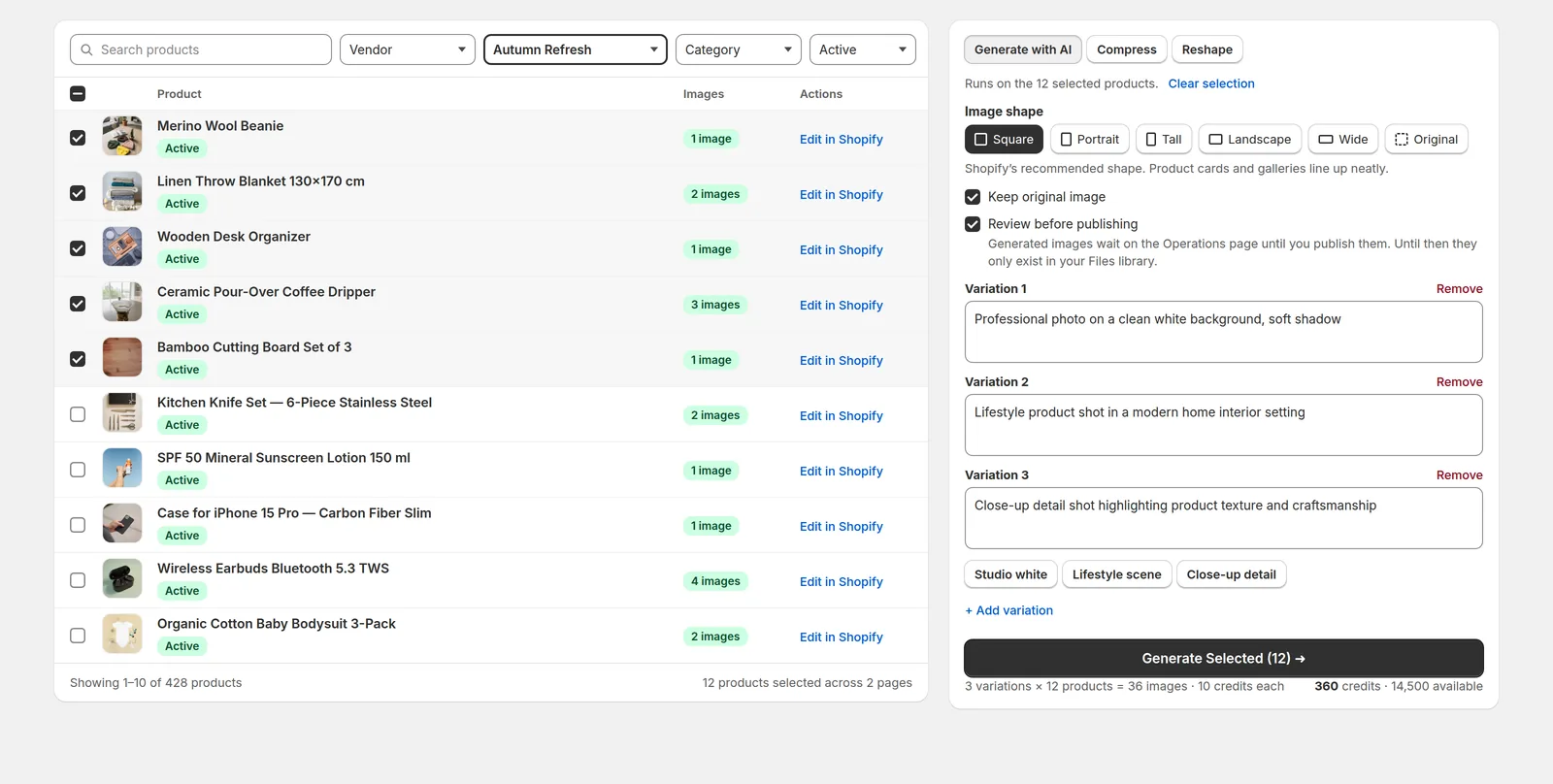
Tick products by hand, filter down to a collection, vendor or category, or leave everything unticked to run the whole catalog. Each run works from the product’s main image, and the button states the scope before you confirm.
Write the prompt
Describe the staging you want — the AI can already see the product in your photo. Add a second or third prompt for more looks per product.
Review, then publish
Results wait on the Operations page next to the original. Publish the ones you like, discard the rest — your products only change when you say so.
Watch the 3-minute tutorial
See a full run of bulk AI product images on a real Shopify catalog: the prompts that keep each product intact, the ones that restage it, and how to review every result before it goes live.
Generate AI product images in bulk, not one at a time
Select products across pages, or filter to a collection and run the lot. Each prompt becomes one image variation per product, so three variations across four hundred products is one confirmation and one run.
- One prompt runs across every selected product
- Choose the output shape — square, portrait, tall, landscape, wide, or leave them as they are
- Cost is shown before you confirm — no surprise spend
Every AI image waits for your approval
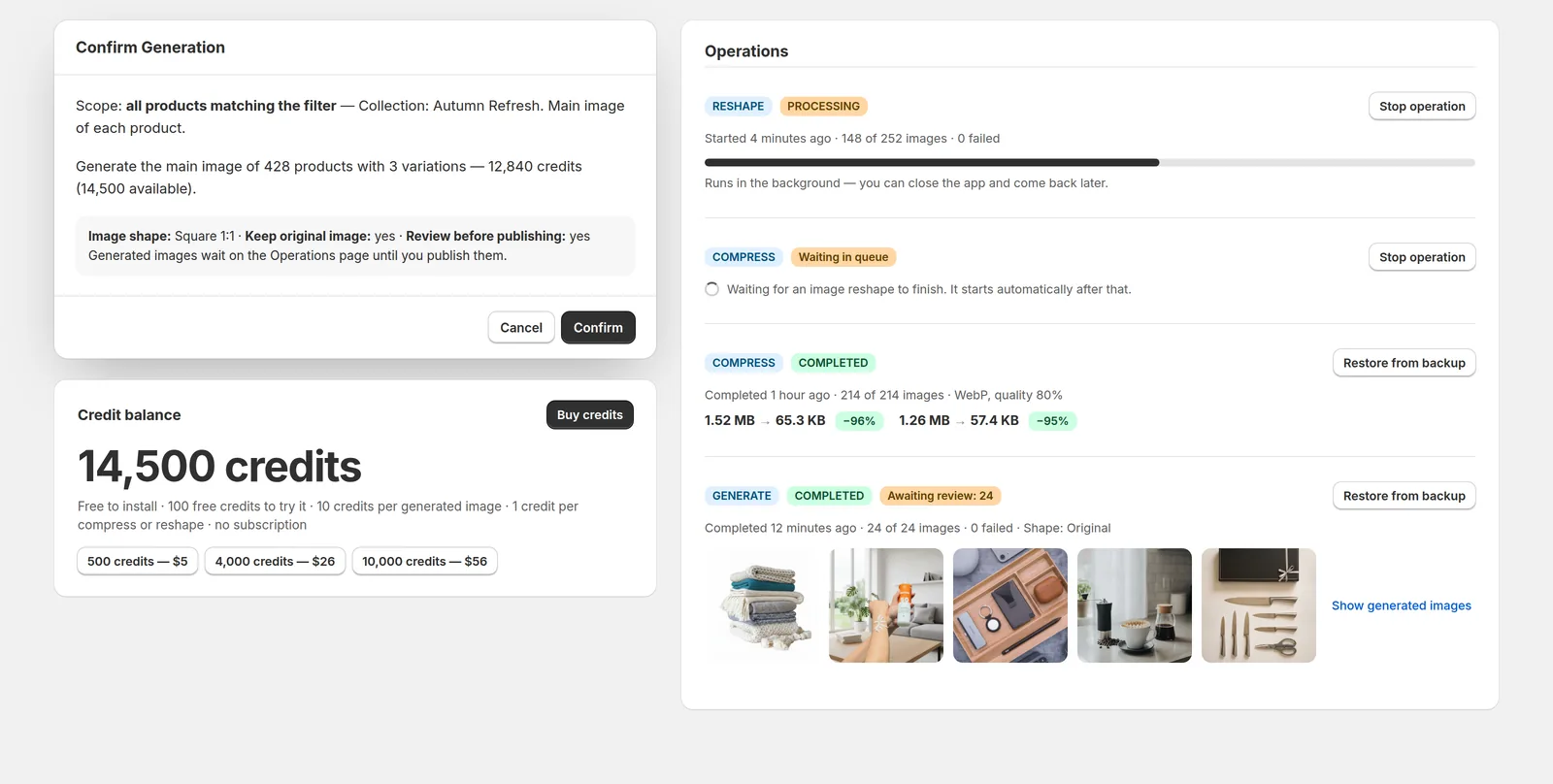
Generated product images land in your Shopify Files library and wait on the Operations page, shown next to the original they came from. Publish the ones that work, discard the rest — your product pages never change behind your back.
- Every result sits beside its original image
- Publish or discard per image, or in bulk
- Turn the review step off once you trust a prompt

Start it, close the tab, come back later
Long runs keep going in the background. Watch progress, see what the queue is waiting on, and stop a run at any point.
- Live progress and a queue that explains itself
- Stop a run and keep what it already produced
- Credit balance and pack prices always in view
Reshape and compress the images you already have
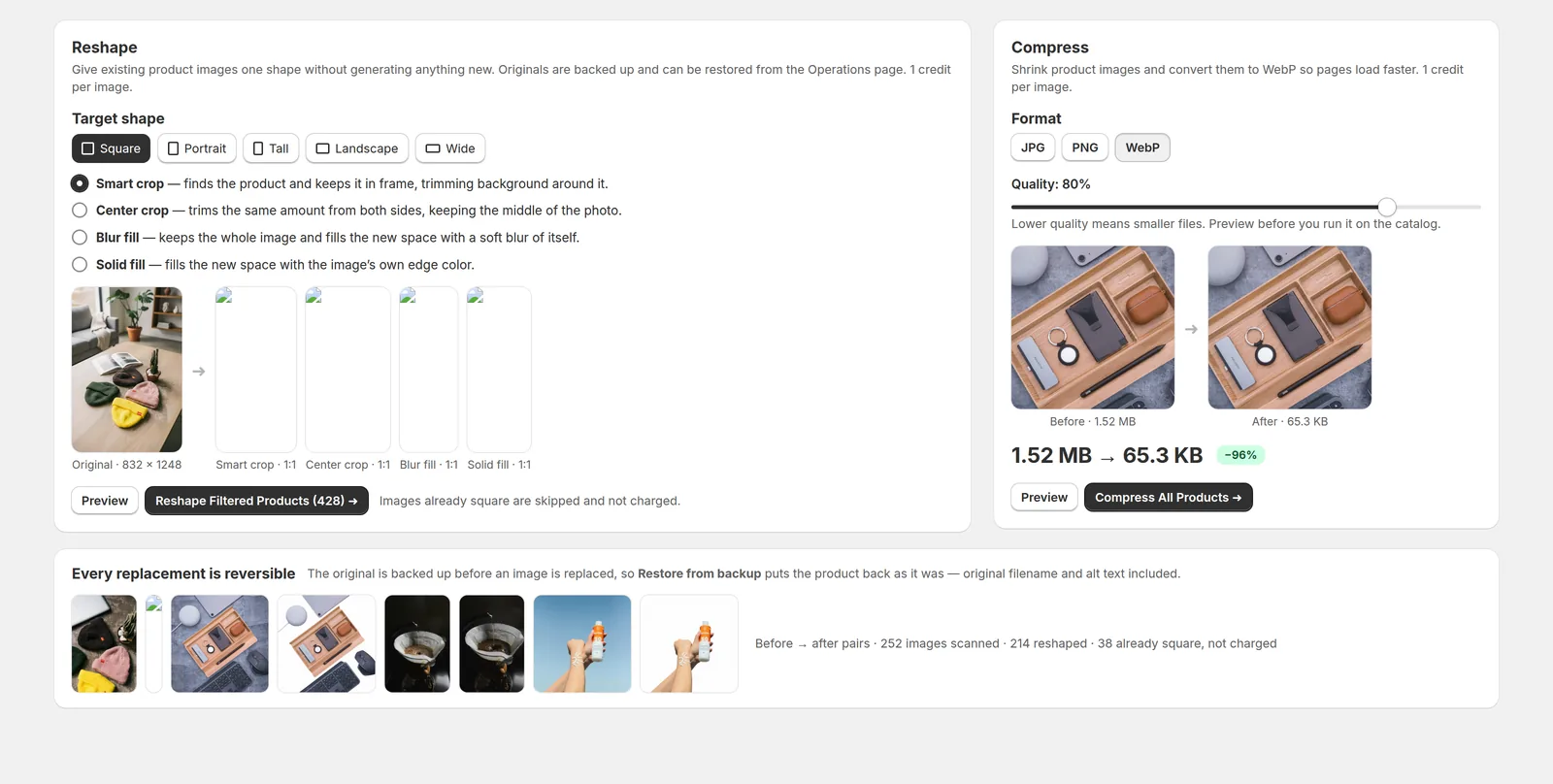
Not every image needs AI. Reshape crops, pads or blur-fills existing photos into one consistent shape, and compression converts heavy files to WebP so product pages load faster. Both cost 1 credit per image.
- Four reshape methods, including a crop that finds the product
- Images already in the right shape are skipped and not charged
- Originals backed up before anything is replaced
What you can ask for
Describe the product image you want in plain English. The product itself stays yours — the setting, lighting and framing are what the AI changes.
Clean white backgrounds
Turn a cluttered supplier shot into a studio image on white — the look marketplaces and product cards expect.
Lifestyle scenes
Place the product in a real setting — a kitchen counter, a bright living room, a table laid for breakfast.
Close-up detail
Zoom in on texture, stitching and material so shoppers can see the quality before they buy.
Seasonal looks
Christmas, Valentine’s, Black Friday — restyle the catalog for a campaign and roll it back afterwards.
One look across suppliers
Unify a catalog photographed by a dozen different vendors. One prompt, one style, every product.
Refresh tired photos
Give dull, flat or dated product shots better lighting, cleaner staging and a more premium feel.
Or anything else you can describe
The prompt is free text, so the scene, props, lighting and framing are yours to set. Try the wording on a handful of products first, then run what worked across the catalog.
Pay for images, not for months
The app is free to install on Shopify and comes with 100 free credits. Credits are bought in one-time packs — there is no subscription, and unused credits stay on your store.
What a credit buys
- Generated image
- 10 credits
- Reshaped image
- 1 credit
- Compressed image
- 1 credit
Your 100 free credits cover ten generated images — enough to find a prompt that works before you spend anything.
Credit packs
500 credits
50 images
4,000 credits
400 images
10,000 credits
1,000 images
Charged once through Shopify billing. Credits carry over between runs, and discarded images are not refunded — which is why the review step exists.
Questions merchants ask
Does the AI create product images from nothing?
No. It works from the product photos you already have. Each generated image is a new version of your existing photo — a clean white background, a lifestyle scene, a close-up — so the product stays recognisably yours.
How many products can one run cover?
As many as you like. Tick individual products, filter down to a collection, vendor or category, or run the entire catalog. The run button always states the scope before you confirm it.
What happens to my original images?
Every original is backed up before anything replaces it, and you can keep the original on the product alongside the new image. Restore from backup puts a product back exactly as it was, original filename and alt text included.
Do generated images go live straight away?
Only if you want them to. Review before publishing is on by default: results wait in your Files library and on the Operations page until you publish or discard each one. Nothing touches a product page before you say so.
Can I control the shape of the images?
Yes. Pick square, portrait, tall, landscape or wide before you run and every generated image comes back in that shape, or leave them in their original shape. Existing photos can be reshaped to match, so product cards and galleries line up.
What does it cost?
The app is free to install and comes with 100 free credits. A generated image costs 10 credits; compressing or reshaping an image costs 1. Credits come in one-time packs — $5 for 500, $26 for 4,000, $56 for 10,000 — with no subscription.
How long does a run take?
You do not have to sit and wait. Runs process in the background, images appear on the Operations page as they finish, and you can close the app and come back. Large catalogs simply take more passes through the queue.
Where do my photos go?
Your product images are sent to Google’s Gemini API to produce the new version, and to Amazon S3 for the backup that makes restore possible. Nothing else leaves your store — the privacy policy lists every processor.
What if a result is not good enough?
Discard it and it never reaches your store. Credits are spent at generation and are not refunded on discard, so it is worth testing a prompt on a few products before running a whole catalog.
Is there a tutorial?
Yes. The 3-minute video tutorial walks through a full bulk run: picking products, writing prompts that keep the product intact, and reviewing results before they publish. It is also on YouTube.
New to this? Read how to generate product images in bulk — the prompts, the costs and what to check before publishing. Or start with what the research says about product images and conversion. Comparing options? See our ranking of the best AI product image generators for Shopify. Not on Shopify? Request access for WooCommerce, Magento and more. Questions before you install? Email info@norlif.com. Or read how we handle your data in the privacy policy, or see what Norlif AI Descriptions, Titles does for the text on the same products.
Try AI product images on ten items before you trust them with four hundred
Install the app on your Shopify store, spend the free credits on a handful of products, and see the AI images next to your originals before anything is published.
Install free