By Mantas Vaitkūnas, Founder, NorlifLinkedIn 11 min read
Prices and ratings checked September 21, 2026. How we picked
Summarize with ChatGPT Claude Perplexity
The best AI product image generator for Shopify is the one that fixes the problem your photos actually have. A catalog of supplier images shot in forty different rooms needs a different tool than one product that wants a nicer backdrop, and a clothing store with flat lays and no models needs something else again. Most of these apps can do a bit of everything. Each is clearly better at one job.
So this list is ranked by job, not by one overall score. It covers five apps from the Shopify App Store, the AI editor built into the Shopify admin and one web tool, with prices and review counts as they stood in September 2026. We make the first app, Norlif AI Image Generator.
Best AI product image generator for Shopify: quick answer
Norlif AI Image Generator (our app) is the best AI product image generator for Shopify when you want to restyle a whole catalog's existing photos from one prompt and review every result before it goes live (free to install, one-time credit packs from $5, no subscription). For a free background change on a single image, use Shopify Magic in the admin file editor. For clean white backgrounds and batch edits synced back to Shopify, use Photoroom (Shopify sync on the $34.99/month Max plan). For ready-made scene presets and AI models at volume, use Modelize ($19/month for 100 images). To put clothing on AI models without a subscription, use StoreYa AI Models & Product Photos ($14 one-time for 60 images). For multi-step edits you reuse on every collection, use Pictu. To upscale and repair low-quality supplier photos, use Claid.ai ($9/month billed yearly for 500 credits).
| App | Best for | Price | Trade-off |
|---|---|---|---|
| 1. Norlif AI Image Generator App Store: 5.0 (3 reviews) | Restyling a whole catalog from one prompt | Free to install; one-time credit packs from $5 | You write the prompts; only 3 reviews |
| 2. Shopify Magic Built into Shopify | A free background change on one image | Free on all plans, for a limited time | One image at a time |
| 3. Photoroom App Store: 4.0 (33 reviews) | Clean white backgrounds and batch edits | Free app; Shopify sync from $34.99/month | Shopify sync needs the Max plan |
| 4. Modelize App Store: 4.9 (25 reviews) | Ready-made scene presets and AI models at volume | Free plan (10 images); from $19/month | Monthly subscription with image allowances |
| 5. StoreYa AI Models & Product Photos App Store: 4.7 (33 reviews) | Putting clothing on AI models, paid once | Free (15 images); packs from $14 one-time | Built for apparel; check garment details |
| 6. Pictu App Store: 5.0 (28 reviews) | Multi-step edits you reuse across collections | Free plan (10/month); from $19.99/month | Small monthly allowances on low plans |
| 7. Claid.ai Not on the App Store | Upscaling and fixing low-quality supplier photos | 50 free credits; from $9/month billed yearly | No Shopify App Store app |
What to look for in an AI product image generator for Shopify
Start with what the tool works from. The useful kind for a store takes your real product photo and changes only the staging: background, surface, light, framing. Shape and color come from your photo. A tool that invents the whole image from a text prompt makes a plausible product that doesn't exist, which is fine for an ad concept and wrong for a listing.
Then look at the workflow. Does the result land on the product in Shopify, or do you download it and upload it again? Can you reject a bad result before shoppers see it? And plan for printed text: AI image models still garble brand names and ingredients on packaging, so products whose labels matter need a closer look whichever tool you pick.
How we picked
We started from Shopify App Store searches for "AI product photo" and "AI product image" plus the tools other roundups keep naming, and kept those that clearly win a job of their own, preferring the stronger rating and review count when two overlapped. Pebblely, a common pick elsewhere, is left out because its Shopify app is not currently available on the App Store. We did not install every app on this list; facts about the others come from their App Store listings, help centers and pricing pages.
We make Norlif AI Image Generator, so read #1 with that in mind. It is ranked first for the job it was built for, and its catch is as plain as everyone else's. Prices, ratings and review counts were checked on the Shopify App Store and vendor pricing pages in September 2026.
1. Norlif AI Image Generator: best for restyling a whole catalog from one prompt
- Price
- Free to install; one-time credit packs from $5
- Shopify App Store rating
- 5.0 (3 reviews)
- Made by
- Norlif
Norlif AI Image Generator is a Shopify app that creates new versions of the product photos you already have, for one product or a whole catalog in a single run, from a prompt you write. Select the products, type something like "professional photo on a clean white background, soft shadow", and each one gets a new image in that style. Add a second prompt for a lifestyle scene or a close-up and you get several variations per product, in the shape you pick: square, portrait, landscape or wide.
What sets it apart is the review step. Results don't go straight onto your products. They wait until you publish or discard them, one by one or in bulk, and originals, filenames and alt text are backed up so any image can be restored. The app also reshapes existing photos to one consistent shape and compresses them to WebP, at 1 credit each.
There is no subscription: 100 free credits on install, 10 credits per generated image, and one-time packs of $5 for 500, $26 for 4,000 or $56 for 10,000 credits. That is about 10 cents an image on the smallest pack and under 6 cents on the largest, and discarded images still use their credits. Our guide on how to generate product images in bulk has prompts that hold up across a catalog.
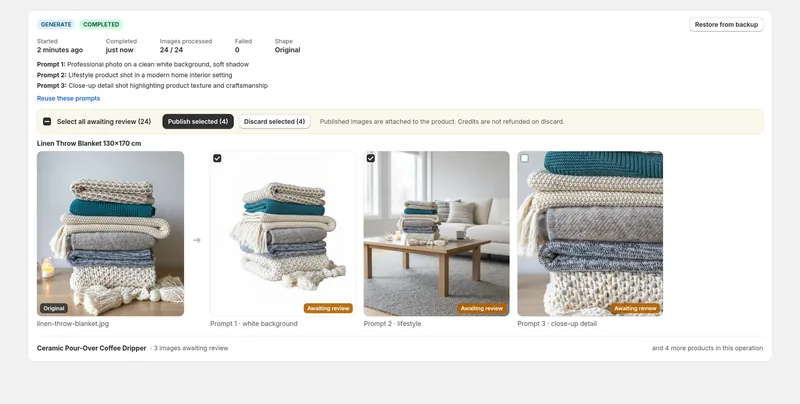
The catch: You write the prompt yourself, so results depend on how well you describe the scene, and like any image model it can garble printed text on packaging and labels. There is no manual retouching canvas, and with 3 reviews since its December 2025 launch it is still a young app.
Who it's for: Stores with dozens or thousands of mismatched supplier photos that want one consistent look, and a chance to reject bad results before shoppers see them.
2. Shopify Magic: best for a free background change on one image
- Price
- Free on all plans, for a limited time
- Made by
- Shopify
Shopify Magic is the AI built into the Shopify admin, and its media tools edit a product image without installing anything. Open an image in the file editor and you can remove the background, swap it for a solid color, or type a prompt such as "on a marble counter, morning light" to generate a new scene. It can also extend an image past its edges when you change the aspect ratio.
Shopify says media generation in the file editor is free on all plans for a limited time, and generated images carry an invisible watermark that doesn't restrict commercial use. For one hero shot or a product you just added, it costs nothing and needs no install.
The catch: It creates one AI scene at a time, and unused scenes are deleted when you close the editor unless you save them to your device. That is fine for five products and slow for five hundred.
Who it's for: New stores, and anyone fixing a few hero images who doesn't want another app or another bill.
3. Photoroom: best for clean white backgrounds and batch edits
- Price
- Free app; Shopify sync from $34.99/month
- Shopify App Store rating
- 4.0 (33 reviews)
- Made by
- Photoroom SAS
Photoroom is a product photo editor known for background removal. Its Shopify app (listed as Photoroom AI Listing Assistant) imports your catalog, lets you edit images in bulk and syncs them back to your products. Beyond cutouts it adds AI shadows, resizes and expands images, and generates AI backgrounds or virtual models when white isn't enough.
Each listing gets a score, so you can see which products still need work. Billed monthly, Pro is $12.99 with 1,000 exports a month and Max is $34.99 with 3,000, and every image saved or synced to Shopify counts as an export.
The catch: You can connect your store on any plan, but publishing edits back to Shopify needs Max ($34.99/month, or $250/year) or above, according to Photoroom's pricing page and help center. The $12.99 Pro plan doesn't include it.
Who it's for: Stores that want every product on a clean, consistent background, including ones that also sell on marketplaces.
4. Modelize: best for ready-made scene presets and AI models at volume
- Price
- Free plan (10 images); from $19/month
- Shopify App Store rating
- 4.9 (25 reviews)
- Made by
- Optify
Modelize (listed as Modelize: AI Image Generator) is a Shopify app for bulk AI product photos that leans on presets: ready-made lifestyle, studio and flat-lay scenes, plus a library of AI human models for on-model shots. You can still write your own prompt, but you don't have to, which makes it quicker to start with than a prompt-first tool.
Results publish straight to your product listings. After a one-time free allowance of 10 images, it is $19 a month for 100 images, $49 for 250 with up to 4K resolution, or $99 for 500 plus $0.20 per extra image. It launched in April 2026 and already has 25 reviews averaging 4.9.
The catch: Every paid plan is a monthly subscription with a set number of images, so a one-off cleanup of an existing catalog means paying monthly for a job you do once.
Who it's for: Stores that add products every month and want consistent scenes or on-model shots without writing prompts.
5. StoreYa AI Models & Product Photos: best for putting clothing on AI models, paid once
- Price
- Free (15 images); packs from $14 one-time
- Shopify App Store rating
- 4.7 (33 reviews)
- Made by
- StoreYa
StoreYa AI Models & Product Photos (listed as AI Models & Product Photos: ST) is a Shopify app that dresses AI-generated models in your clothing, so plain product photos of clothing become on-model shots without a photoshoot. Pick ready-made models or create your own across body types, skin tones and styles, then set poses and backgrounds. It connects to your product feed, so you can generate and update images in a few clicks.
Pricing is one-time packs: 15 generations free, then $14 for 60, $45 for 225 or $99 for 550, with no monthly fee. There is also an AI try-on feature for shoppers.
The catch: Garment details are where AI models slip. One merchant review describes a jacket that came back with the wrong colors, missing buttons and no embroidery, so compare every image with the real item before it goes live.
Who it's for: Clothing stores with plain product photos and no budget for a model shoot.
6. Pictu: best for multi-step edits you reuse across collections
- Price
- Free plan (10/month); from $19.99/month
- Shopify App Store rating
- 5.0 (28 reviews)
- Made by
- Pictu
Pictu (listed as Pictu: AI Image Generator Bulk) is a Shopify app for bulk AI image editing built around flows: saved sequences of editing and generation steps that you run across a whole collection and reuse later. It covers lifestyle and on-model images, background removal and image variations, and a prompt improver helps when your own wording falls flat.
That suits stores that give every new collection the same treatment. The free plan includes 10 image edits and generations a month, and Starter is $19.99 a month for 150, with a 3-day free trial. All 28 App Store reviews are five stars.
The catch: The allowances are small at the low end. At 150 images a month on Starter, one new image for each product in a 1,000-product catalog takes about seven months. The higher plans switch to token allowances, and the listing doesn't say how many tokens an image uses.
Who it's for: Stores that apply the same multi-step image treatment to every new collection or supplier drop.
7. Claid.ai: best for upscaling and fixing low-quality supplier photos
- Price
- 50 free credits; from $9/month billed yearly
- Made by
- Let's Enhance
Claid.ai is a web-based AI photo editor and API for online stores, and its strength is repairing weak source photos: upscaling low-resolution images and fixing dark or faded color. It also removes backgrounds, generates AI photoshoot scenes and puts clothing on AI fashion models.
You pay in credits per operation. The free trial has 50 credits. Essentials is $15 a month for 500 credits at up to 2K, or $9 a month billed yearly, and Pro is $49 a month for 2,000 credits with 4K generation, or $35 a month billed yearly. A background removal costs 1 credit, an upscale 2 to 8 and a standard AI photoshoot image 4. Claid says its API can check and edit images against a platform's requirements automatically.
The catch: Claid has no app on the Shopify App Store. You connect it through Zapier (Claid offers that only on its Pro plan) or its API, or download the images and upload them to your products yourself.
Who it's for: Stores whose supplier photos are too small, blurry or dark to use, and teams comfortable with Zapier or an API.
Which AI product image generator should you pick?
| If this is you | Pick |
|---|---|
| You want one consistent look across hundreds of existing product photos | Norlif AI Image Generator |
| You need a better background on a few images and no new bill | Shopify Magic |
| You want every product on a clean white background, synced to Shopify | Photoroom |
| You add products monthly and want preset scenes without writing prompts | Modelize |
| You sell clothing and need on-model photos without a shoot | StoreYa AI Models & Product Photos |
| You repeat the same multi-step edit on every new collection | Pictu |
| Your supplier photos are too small, blurry or dark | Claid.ai |
You may end up with two of these: one tool that makes the whole catalog consistent and one for the occasional special shot. If mismatched supplier photos are what shows on your collection pages, Norlif AI Image Generator is built for that run.
If the photos are fine but the product data around them isn't, see the best AI product description generators for Shopify. For video on product pages, read the best product video apps for Shopify.
Frequently asked questions
What is the best AI product image generator for Shopify?
Norlif AI Image Generator (our app) is the best pick for restyling a whole catalog of existing photos from one prompt, with a review step before anything goes live. Shopify Magic is the free pick for a single image, Photoroom for white backgrounds, and Modelize or StoreYa AI Models & Product Photos for on-model clothing shots.
Can Shopify generate product images with AI for free?
Yes. Shopify Magic in the admin file editor can remove or recolor a background and generate a new scene from a text prompt, and Shopify says media generation there is free on all plans for a limited time. It works on one image at a time, so it suits a few hero images better than a whole catalog.
Can AI create product photos for my whole Shopify catalog at once?
Yes. Norlif AI Image Generator (our app), Modelize, Pictu and Photoroom all work in bulk across products or collections. Where they differ: you write prompts or pick presets, results wait for your review or publish straight away, and you pay monthly or buy one-time credits.
Will AI product photos change how my product looks?
They can. Tools that start from your own photo keep the product's shape and color far better than text-only generators, but printed text on labels, garment details like buttons and embroidery, and exact colors can still drift. Check each result against the real product before you publish it.
How much do AI product photos cost on Shopify?
Prices vary a lot by tool. Norlif AI Image Generator (our app) works out to about 10 cents an image on its $5 pack and under 6 cents on its $56 pack, Modelize is $19 a month for 100 images, and StoreYa AI Models & Product Photos is $14 one-time for 60. Shopify Magic is free for now, one image at a time.
Written by Mantas Vaitkūnas, founder of Norlif. Norlif makes three Shopify apps for product data: one for product text (Norlif AI Descriptions, Titles), one for product images and one for YouTube review videos. Before Norlif, Mantas ran the price-comparison site kainoteka.lt, comparing the same products across hundreds of online stores, which is where the state of product data became hard to ignore.
Sources
- Shopify Help Center: Media generation in the file editor
- Shopify Help Center: Using the media editor
- Photoroom: Pricing
- Photoroom Help Center: What is Photoroom for Shopify?
- Claid.ai: Pricing
Prices, ratings and review counts come from each app's Shopify App Store listing or the vendor's pricing page, checked on September 21, 2026. They change, so confirm on the listing before you install. Spotted something out of date? Email info@norlif.com.