WebP vs PNG: Which Image Format to Upload to Shopify
By Mantas Vaitkūnas, Founder, NorlifLinkedIn 7 min read
WebP makes smaller files than PNG: Google says lossless WebP is 26% smaller, and WebP can also be lossy, which PNG can't. On Shopify the choice matters less than that suggests, because Shopify picks the format each shopper receives and can serve WebP or AVIF whatever you uploaded. So upload PNG for logos, graphics and cutouts with transparent backgrounds, JPEG or PNG for photos, and WebP when your file already is one.
| Format | Transparency | Upload to Shopify for |
|---|---|---|
| PNG, lossless | Yes | Logos, icons, graphics with text, cutouts |
| JPEG, lossy | No | Product photos, banners, slideshows |
| WebP, lossy or lossless | Yes | Files that are already WebP |
| AVIF, lossy or lossless | Yes | Not accepted as an upload |
WebP vs PNG: the difference
PNG is lossless. It stores every pixel exactly, which keeps text and sharp edges clean, and it supports transparency. MDN's image format guide recommends it for screenshots, diagrams, logos and line art.
WebP can be either. Lossless WebP keeps every pixel like PNG does, in a smaller file. Lossy WebP throws away detail the eye is unlikely to miss, like JPEG. Both kinds support transparency and animation. Google's figures:
- Lossless WebP files are 26% smaller than PNG.
- Lossy WebP files are 25 to 34% smaller than comparable JPEG files at the same quality index.
- A transparent background makes a lossless WebP file about 22% bigger.
- Lossy WebP with transparency is typically three times smaller than the same image as PNG.
One product photo in four formats
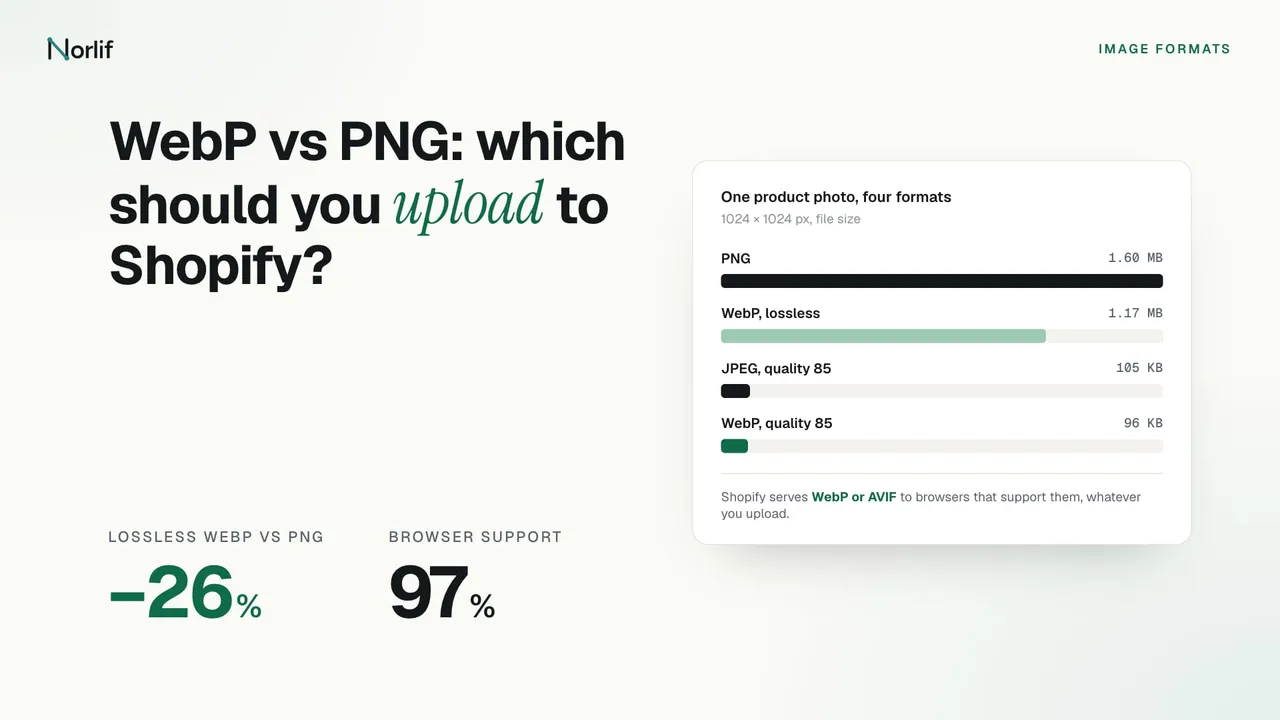
I saved a 1024 × 1024 px product photo of a backpack in each format with the sharp image library (version 0.34.5, with libwebp 1.6.0 and mozjpeg) on November 19, 2026. The PNG is the original file.
| Format | File size |
|---|---|
| PNG | 1,596 KB |
| WebP, lossless | 1,173 KB (26.5% smaller than the PNG) |
| JPEG, quality 85 | 105 KB |
| WebP, quality 85 | 96 KB |
The lossless result landed right on Google's 26%. The real gap is between lossless and lossy: the PNG was 15 times the size of the JPEG. Quality 85 doesn't mean the same thing in JPEG and WebP, so read the last two rows as a rough comparison, not a measurement of quality.
What Shopify does with each format on upload
Shopify's product media page says the best file type for most product images is PNG, followed by JPEG. It also accepts TIFF, BMP, GIF, SVG, HEIC and WebP. The limits don't depend on the format: up to 5000 × 5000 px or 25 megapixels, in a file smaller than 20 MB.
Shopify doesn't compress images when you upload them. The theme images page says so and adds that you don't need to compress them yourself first. Two conversions do happen on upload: TIFF and BMP files are converted to JPEG or PNG.
The same page recommends JPEG for products, banners, slideshows and blog images, and PNG for logos, icons, borders and trims. Shopify's two pages disagree on product photos, PNG first on one and JPEG on the other. For a photo, either is fine.
What Shopify serves to shoppers
The format you upload isn't necessarily the format shoppers download. Shopify keeps your original and serves resized copies through its CDN. For each copy it selects a format from the shopper's browser and the image itself, such as its dimensions. Browsers that support WebP or AVIF can get those, though Shopify says AVIF isn't used at every image size. GIFs are converted to animated WebP.
Shopify adds that served images might be compressed. Shopify's developer docs say the copy shoppers download can be re-saved or switched to another format, and that a JPEG can't usefully be turned into a PNG.
Shopify also removes colour profiles from images it displays, and browsers then assume sRGB. Export in sRGB, whatever the format, so the colours match what you approved.
Which format to upload
- Product photos: JPEG at high quality, or PNG if that is what you have and it is under 20 MB. Shopify can serve a smaller format to browsers that support one.
- Products cut out on a transparent background: PNG or WebP. JPEG has no transparency, so the background gets filled with a colour.
- Logos, icons and graphics with text: PNG. Lossy compression blurs sharp edges and text.
- Banners and slideshows: JPEG, as Shopify recommends. The Shopify banner size guide covers dimensions.
- Files that are already WebP, from a supplier or an image generator: upload them as they are. Converting a lossy WebP to PNG makes the file bigger and doesn't bring back lost detail.
- Animations: GIF or animated WebP. Shopify accepts both.
What I'd skip is converting JPEGs to lossy WebP before uploading. Shopify can already serve WebP or AVIF to browsers that take them, and it asks you to upload the best quality you have. A conversion first adds a round of compression, and Shopify may compress the served copy again.
WebP vs JPEG
The same logic applies. Lossy WebP is the smaller format, by Google's 25 to 34% at equal quality. Since Shopify decides the delivery format, a JPEG upload doesn't stop shoppers from getting WebP. Upload the higher-quality file of the two.
Browser support
Can I use puts WebP support at about 97% of browsers in use globally on November 19, 2026. Chrome has supported it since version 32, Firefox since 65, Edge since 18 and Safari on iPhone since iOS 14. Desktop Safari 14 to 15.6 support it only on macOS 11 Big Sur or later, and Safari 16 and later support it fully.
On a Shopify store this is handled for you. Shopify detects which formats each browser supports, so an old browser gets a format it can open.
Google Shopping and Google Search
WebP is safe beyond your store. Google Merchant Center accepts JPEG, WebP, PNG, GIF, BMP and TIFF product images, as long as the file extension matches the real format. Google Search supports BMP, GIF, JPEG, PNG, WebP, SVG and AVIF.
Converting images in bulk
The free Shopify image resizer converts up to 100 images at a time to JPG, PNG or WebP, with a quality setting, in your browser. It is the quick way to turn a folder of huge PNG photos into JPEGs before upload. The Shopify product image size guide has the sizes to aim for.
For images already in your store, I make Norlif AI Product Photos. Its Compress tab re-saves product images as JPG, PNG or WebP at the quality you choose, for 1 credit per image. You can preview the result first, and the originals are backed up so you can restore them. Shopify already chooses the format shoppers get, so I'd use it to shrink oversized originals, not to change the format for its own sake.
Frequently asked questions
Is WebP better than PNG?
For file size, yes. Google says lossless WebP files are 26% smaller than PNG, and WebP can also be lossy, which PNG can't. Both keep transparency. For logos, icons and graphics, Shopify recommends PNG.
Does Shopify convert images to WebP?
It can, when it serves them. Shopify keeps the file you uploaded and picks a delivery format for each visitor based on the browser and the image. Browsers that support WebP or AVIF can get those formats, whatever you uploaded. GIFs are served as animated WebP.
Should I convert my images to WebP before uploading them to Shopify?
Usually not. Shopify's help page says that when a shopper's browser supports WebP or AVIF, your images might be delivered in those formats, so they often reach shoppers as WebP or AVIF without any work from you. Converting a JPEG to lossy WebP first adds another round of compression, and Shopify may compress the served copy again.
Does WebP support transparency?
Yes. Both lossless and lossy WebP keep a transparent background. Google says lossy WebP with transparency is typically three times smaller than the same image as PNG. JPEG has no transparency at all.
Can I upload AVIF images to Shopify?
AVIF isn't on Shopify's lists of accepted upload formats. Shopify can still serve your images as AVIF to browsers that support it, but not at every image size.
Is WebP or JPEG better for product photos?
WebP makes smaller files: Google measured lossy WebP at 25 to 34% smaller than JPEG at the same quality. On Shopify that matters little, because Shopify chooses the delivery format itself. Upload whichever high-quality file you have.
Does Google Shopping accept WebP images?
Yes. Google Merchant Center lists WebP as a supported format for product images, along with JPEG, PNG, GIF, BMP and TIFF. Google Search also supports WebP and AVIF images.
Read next: Shopify product image size limits and what to upload, and the Shopify banner, logo and favicon sizes.
Sources
- Shopify Help Center: Uploading images
- Shopify Help Center: Supported media types
- Shopify developer docs: image_url filter
- Google for Developers: An image format for the Web (WebP)
- MDN Web Docs: Image file type and format guide
- Can I use: WebP image format (checked November 19, 2026)
- Google Merchant Center Help: Image link [image_link]
- Google Search Central: Image SEO best practices