Shopify Banner Size: Hero, Logo and Other Image Sizes
By Mantas Vaitkūnas, Founder, NorlifLinkedIn 7 min read
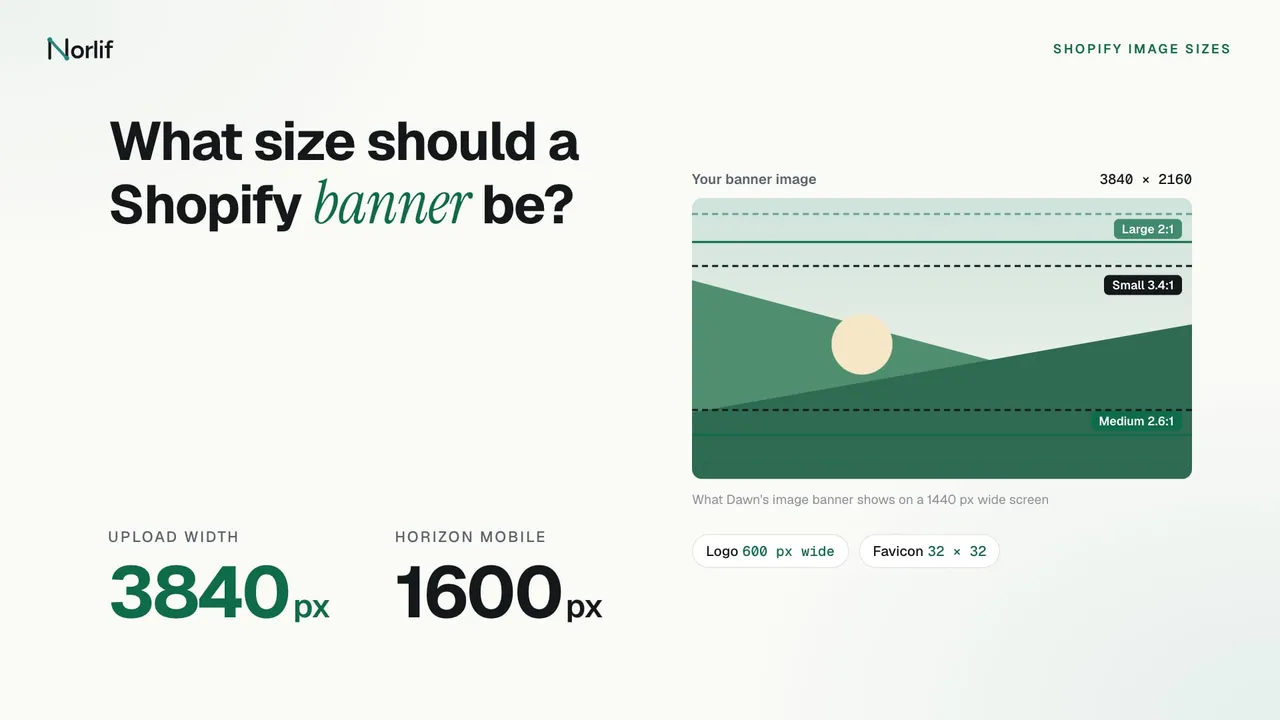
Shopify doesn't publish a banner size. Its help page on theme images says the dimensions that work best depend on your theme and theme version. In Shopify's own free themes, Dawn and Horizon, a full-width banner loads versions of your image up to 3840 px wide. So upload a landscape image 3840 px wide, and pick its height by the banner's height setting. For Dawn's default Medium height, that is 3840 × 1500 px. The table has the other theme images.
| Image | Size to upload |
|---|---|
| Full-width banner, hero or slideshow | 3840 px wide, landscape |
| Separate mobile hero image (Horizon) | 1600 px wide, portrait or square |
| Logo in Dawn | At least 600 px wide |
| Logo in Horizon | At least 200 px tall |
| Favicon | Square, served at 32 × 32 px |
| Product image | 2048 × 2048 px for square |
| Upload limit for theme images | 20 megapixels and 20 MB |
Only the favicon, product image and upload limit rows are Shopify's own numbers. The rest come from reading the code of Dawn 16.2.0 and Horizon 4.5.0 on Shopify's GitHub, on November 19, 2026. Other themes differ, and their documentation is the place to check.
Why 3840 px wide?
A theme doesn't send your original file to every visitor. It lists several widths of the image and the browser picks the one that fits the screen. With the default image behaviour, Dawn's image banner and slideshow list widths from 375 to 3840 px. Horizon's hero section lists 832 to 3840 px. The widest versions are for large monitors and sharp "retina" laptop screens, which need about twice as many pixels as the banner's width.
Shopify can't make those versions larger than your file. Shopify's developer docs say an image is never resized beyond its original dimensions, so a 1200 px banner gets stretched by the browser on any screen that needs more. Uploading big doesn't slow anyone down, because phones still get the small versions.
Shopify's blog on image sizes says "General starting points include 1,920 pixels wide for banners", and its table suggests 1280 × 720 px for a hero image and 1200 × 400 px for a website banner. Those are general web figures, smaller than what Dawn and Horizon request. If 1920 px is the widest you have, use it; below that, banners look soft on laptops.
How tall should the banner be?
That depends on the section's height setting, because the section has its own shape and crops your image to fill it. Shopify's help page explains it: wide images lose their sides on tall screens such as phones, and tall images lose their top and bottom on wide screens.
In Dawn, the image banner and slideshow have four heights. "Adapt to first image" sizes the section to your image, so nothing is cropped. Small, Medium and Large give the section a minimum height on screens 750 px wide and up. I worked out the shape each one has on a 1440 px wide laptop screen and the upload size that matches it:
| Dawn height | Minimum height | Shape at 1440 px wide | Upload |
|---|---|---|---|
| Small | 420 px | About 3.4:1 | 3840 × 1120 px |
| Medium (default) | 560 px | About 2.6:1 | 3840 × 1500 px |
| Large | 720 px | 2:1 | 3840 × 1920 px |
| Adapt to first image | Your image's shape | Your image's shape | 3840 px wide, any height |
These are starting points. A wider screen makes the section flatter and crops more off the top and bottom, and a long heading can make it taller. Keep the subject in the middle third of the image and leave space around it.
In Horizon, the hero's height is a share of the screen height. On screens 960 px wide and up, Small is 50%, Medium 65% and Large 80% of the screen height. From 640 to 959 px wide they are 40%, 55% and 70%, and on phones they are fixed heights. There are also Auto, Full screen and Custom options. Because the shape changes with every window, a fixed upload size can't match it exactly. A 16:9 image, 3840 × 2160 px, leaves room to crop in both directions.
Banners on phones
Dawn's image banner has no separate mobile image. On screens under 750 px wide it keeps the same file and gives the section a minimum height of 280, 340 or 390 px for Small, Medium and Large. On a 375 px wide phone that is close to a square cut from the middle of your landscape image.
Horizon's hero has a "Show different media on mobile" setting. Turn it on and you can upload a second image for phones, which Horizon loads at up to 1600 px wide. A portrait or square image 1600 px wide works there.
Two settings help whatever the theme. A focal point marks the part of the image that has to stay in frame when a section crops it; Shopify lists Dawn 7.0.0 and later and the whole Horizon family as supporting it. And Shopify's help page advises against putting text inside banner images, since cropping can cut it off. Add headings and buttons in the theme editor instead.
Slideshows
Dawn's slideshow loads the same widths as the image banner and has the same height options. With "Adapt to first image", the section takes the shape of the first slide, and Shopify notes that any slide with a different shape is then cropped. Make every slide the same size, 3840 px wide and the same height.
Logo size
In Dawn, you set the logo's Width in theme settings, from 50 to 300 px, with 100 px as the default. The theme loads the logo at that width, 1.5 times it and twice it, for sharper screens. A logo 600 px wide covers the largest setting.
Horizon works by height instead. Desktop height goes from 12 to 100 px with a default of 36, and mobile height from 12 to 100 px with a default of 28. The width follows your logo's shape. I'd upload a logo at least 200 px tall, twice the largest setting, for high-density screens.
Use PNG for a logo. Shopify's theme images page recommends PNG for logos, icons and graphics with flat colours, and PNG keeps a transparent background.
Favicon size
Shopify's favicon help page says the ideal favicon is 16 × 16 or 32 × 32 px, and a larger image is reduced to 32 × 32 px when you upload it. Dawn and Horizon both serve it at 32 × 32 px.
Google shows favicons in search results too. Google's favicon guidelines require a square image of at least 8 × 8 px and recommend one larger than 48 × 48 px. Shopify's themes serve 32 × 32 px, which meets the requirement but not the recommendation. Upload a simple, square image that still reads at that size.
Collection and product images
Collection images have the same limits as product images: up to 5000 × 5000 px or 25 megapixels, smaller than 20 MB. Dawn only shows a collection image in the collection banner when you tick its Image setting, and then beside the collection title at about half the page width. 1500 px wide is plenty there.
For product photos, Shopify says 2048 × 2048 px usually displays best for square images. The guide to Shopify product image sizes has the limits, formats and Google Shopping rules.
Upload limits and file format
Shopify's theme images page lists 20 megapixels and 20 MB as the limits for images uploaded to Shopify, with separate, higher limits for product images. Megapixels are width times height divided by a million, so 3840 × 2160 px is about 8.3 megapixels. Even a 5000 px wide banner fits if it isn't too tall.
The same page recommends JPEG for banners and slideshows. You don't have to compress the file first: Shopify says images aren't compressed on upload, and it can serve them as WebP or AVIF to browsers that support those formats. The guide to WebP vs PNG on Shopify covers which format to upload when.
Resizing images to these sizes
The free Shopify image resizer runs in your browser. Set a custom size such as 3840 × 1500 px, choose to crop or pad photos into that shape, and download them as JPG, PNG or WebP. It takes up to 100 images at a time, which is handy for a set of slides.
For product photos already in your store, I make Norlif AI Product Photos, a Shopify app that reshapes and compresses product images in bulk and generates new product photos from the ones you have. It works on product images only, not on theme banners.
Frequently asked questions
What size should a Shopify banner be?
Shopify publishes no banner size and says the right dimensions depend on your theme. Its free themes Dawn and Horizon load full-width banners in versions up to 3840 px wide, so a landscape image 3840 px wide covers every screen. If you only have a smaller image, 1920 px wide is the least I would use, which is also the starting point Shopify's blog gives for banners.
What is the Shopify hero image size?
Shopify gives no official hero size. Horizon's hero section loads images up to 3840 px wide on desktop and lets you add a separate mobile image, which it loads up to 1600 px wide. Shopify's blog suggests 1280 × 720 px as a general starting point, which is smaller than what the themes request.
Why is my Shopify banner cropped?
Banner and slideshow sections have their own shape, set by the section's height setting and the screen, and they crop any image with a different shape. Choose the "Adapt to first image" height to show the whole image, or set a focal point on the part that must stay in frame.
What size should a Shopify logo be?
In Dawn, the logo width setting goes from 50 to 300 px and the theme loads the logo at up to twice that width, so upload a logo at least 600 px wide. In Horizon you set the logo height, from 12 to 100 px, so a logo at least 200 px tall stays sharp at any setting.
What size is the Shopify favicon?
Shopify's help center says 16 × 16 or 32 × 32 px is ideal and that a larger favicon is reduced to 32 × 32 px on upload. Dawn and Horizon both serve the favicon at 32 × 32 px. Use a square image.
What is the largest banner image I can upload to Shopify?
Shopify's help page on theme images lists 20 megapixels and 20 MB as the limits for images uploaded to Shopify. A 3840 × 2160 px banner is about 8.3 megapixels, well within that. Product and collection images have their own limit of 5000 × 5000 px or 25 megapixels.
Read next: Shopify product image size limits and what to upload, and what the research says about product images and conversion.
Sources
- Shopify Help Center: Uploading images
- Shopify Help Center: Adding a favicon to your store
- Shopify Help Center: Supported media types
- Dawn 16.2.0 on GitHub: image banner section
- Dawn 16.2.0 on GitHub: banner heights
- Dawn 16.2.0 on GitHub: slideshow section
- Dawn 16.2.0 on GitHub: header and logo
- Dawn 16.2.0 on GitHub: theme settings
- Dawn 16.2.0 on GitHub: collection banner
- Horizon 4.5.0 on GitHub: hero section
- Horizon 4.5.0 on GitHub: section heights
- Horizon 4.5.0 on GitHub: theme settings
- Shopify developer docs: image_url filter
- Shopify blog: Website Image Size Guidelines for 2027
- Google Search Central: Define a favicon to show in search results